Varroa in BeePulse: how to count, when to treat and whether it worked
A guide to the Varroa page: why counting is worth it, how to record a count, what to do with the result and how to see whether a treatment worked.
- Varroa
- Colony health
- Mobile app
In August the colonies look their best of the year. Full frames, plenty of bees, honey in the supers. That is exactly why varroa is easy to miss: the mites sit in capped brood, not on the frame you lift, and by the time you see bees with deformed wings it is usually late for the winter bees.
A number takes the guessing out. The Varroa page in BeePulse keeps every hive's counts in one place, tells you what each result means and, after a treatment, how well it worked. Here it is step by step: why, how, and what to do with what you find.
Why count instead of guessing
The mite load grows all summer while the colony starts to shrink towards autumn. The same mites end up on fewer bees, and the bees raised in August and September are the ones that have to carry the colony to spring. If you count, you see the rise weeks before it shows on the frames.
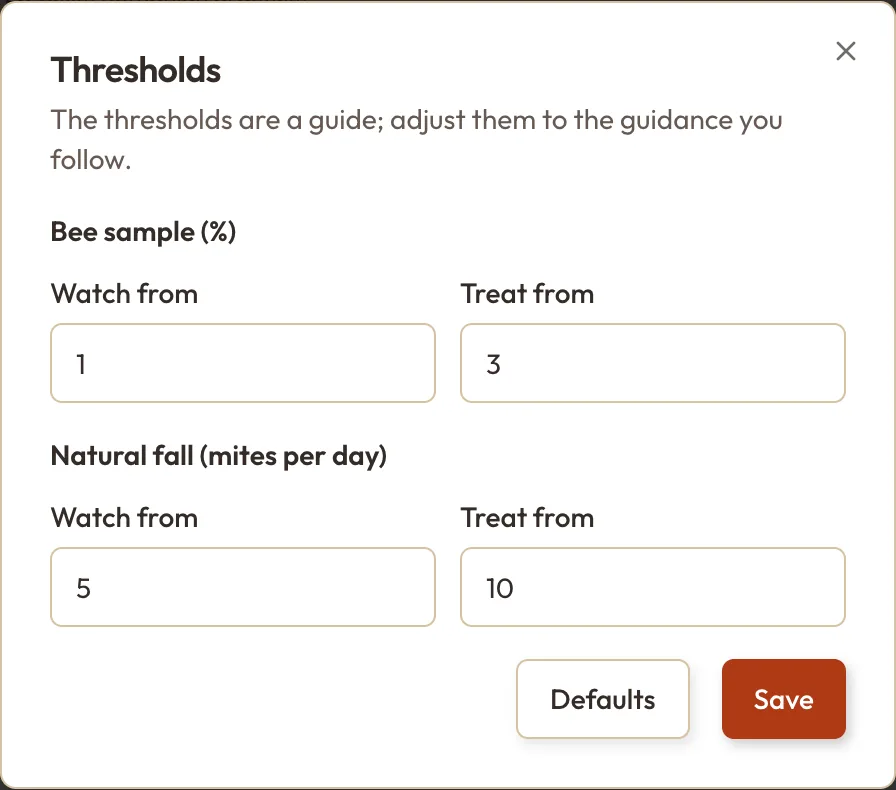
BeePulse starts from guide thresholds that are common in beekeeping guidance: for a bee sample, Watch from 1% and Treat from 3%; for natural fall, from 5 and from 10 mites a day. The sources are on the page (Honey Bee Health Coalition, 2022; LAVES Celle; Romanian practice), and you can change the thresholds.
The Varroa page at a glance
You'll find it in the left-hand menu under Varroa. Each hive has a row, and the hives that need treating come first.
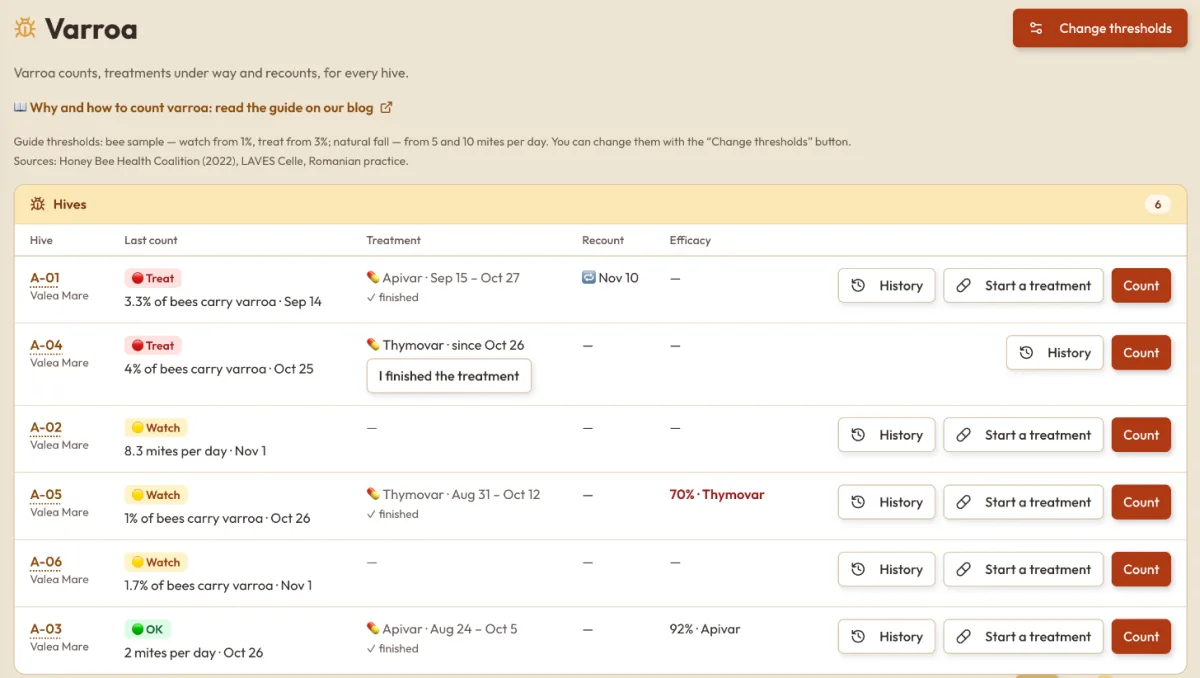
- Last count shows the result and a coloured verdict: green OK, yellow Watch, red Treat.
- Treatment shows the treatment under way, with the I finished the treatment button, or the last one that ended.
- Recount is the day to count again, two weeks after a treatment.
- Efficacy tells you how much the infestation fell after the last treatment.
On the right are three buttons: History, Start a treatment and Count.
How to count
Press Count on the hive's row and choose how you counted.
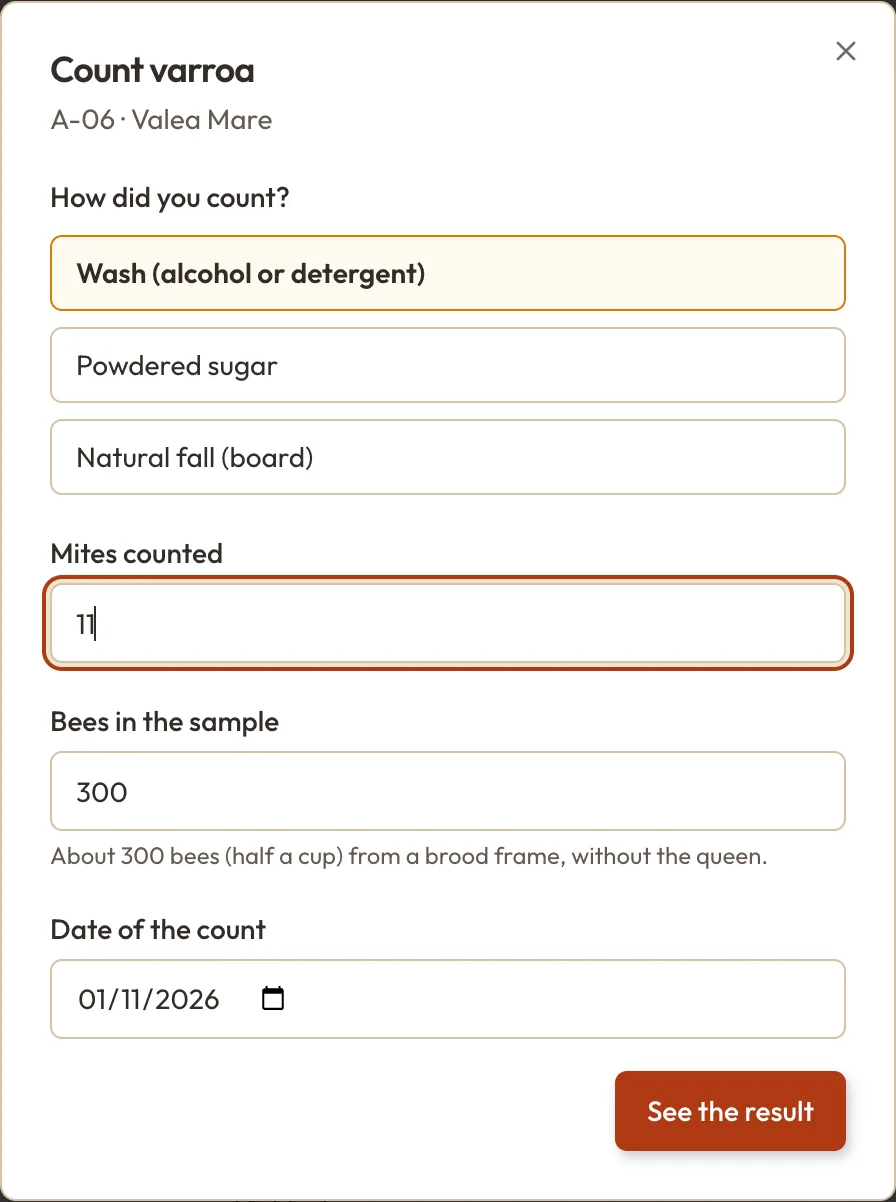
- Wash (alcohol or detergent): about 300 bees, half a cup, from a brood frame and without the queen. It is the most reliable method, but the bees in the sample die.
- Powdered sugar: the same sample, shaken in sugar, and the bees go back to the hive. It misses a few more mites than a wash.
- Natural fall (board): count the mites on the board under a screened floor and enter how many days it was in.
Enter the mites you found, check the number of bees or days, and the date. You can move the date back if you are copying counts from your notebook. You can also count from the phone app, on the hive's page, standing at the hive.
What to do with the result
After See the result you get the percentage, the coloured verdict and one sentence on what comes next. The app does the arithmetic: 11 mites in 300 bees is 3.7%, above the treat threshold.
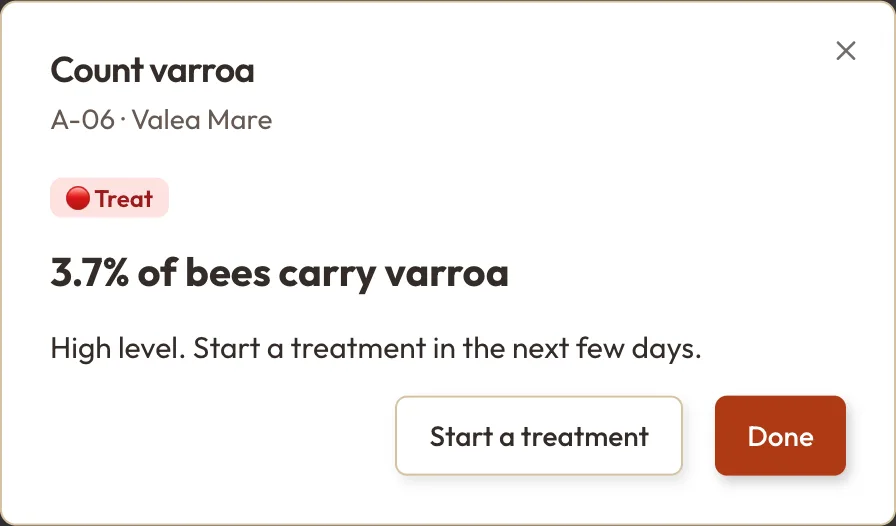
If it says Treat, Start a treatment takes you to the treatment log with the form open and the hive already chosen. Enter the product, the method and the date. The no-harvest period then shows on the Varroa page, under the treatment.
When the treatment ends
When you take the strips out or give the last dose, press I finished the treatment on the hive's row. From that day the clock runs: after 14 days it is worth counting again, with the same method as before. The date shows in the Recount column. With Pro you also get a phone notification, and the recount goes on your To Do list.
Did the treatment work?
This is the step many beekeepers skip, because on paper it is hard to keep track of. BeePulse compares the count before the treatment (from the 30 days before, including the day you started it) with the first count after it, made with the same method, and shows how much the infestation fell.
History opens the hive's story, newest first: the counts, the start and end of each treatment, the recount due and the efficacy.
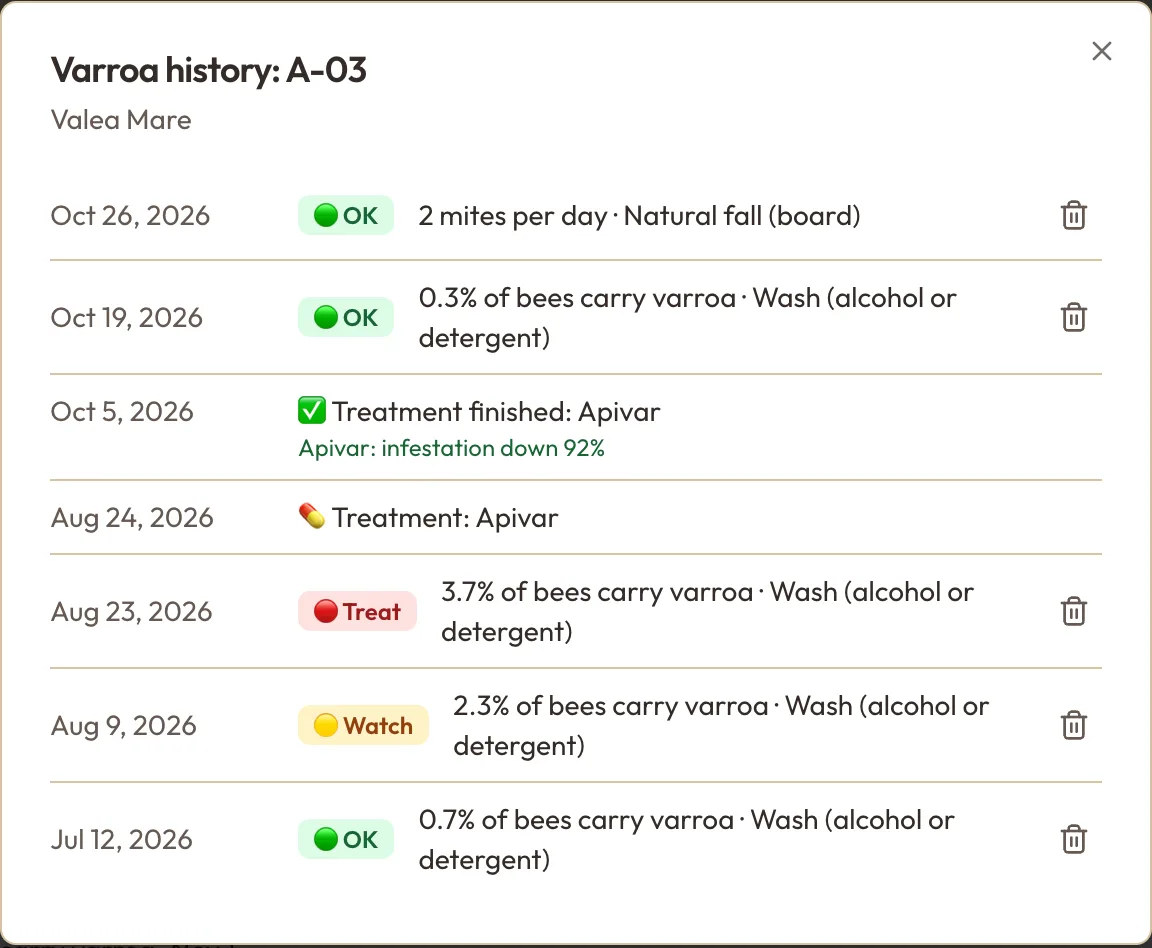
On the hive in the picture, Apivar brought the infestation down from 3.7% to 0.3%, which is 92%. Below 90% the result shows in red. On another hive, Thymovar put on at the end of August, with cold nights, only managed 70%. That does not necessarily mean the product is weak, but it is a sign to look at the conditions and to try a different active substance next time. Under the table, Efficacy by product averages each product used in your apiary.
The thresholds are yours
1% and 3% are a starting point, not a rule. Some associations and vets recommend other values, and natural fall reads differently depending on the season. Change thresholds lets you match the guidance you follow, and Defaults takes you back to the starting values. The thresholds apply to every hive in the account.
What is free and what is in Pro
On the free Start plan you get the counts, the coloured verdict, the treatments and each hive's history. Pro adds the part that remembers for you: the scheduled recount and its notification, recounts on the To Do list, and the efficacy of every treatment, per hive and per product.
What it doesn't do
The app does not choose the product or set the dose. For that, follow the product label and your vet's advice. It keeps the record: when you counted, what you found, what you did and whether it worked.
The first count takes ten minutes. From the second one on, you have something to compare with.