Hive inspection checklist on your phone: record everything in about 30 seconds
With Quick Log in BeePulse you record the queen, brood, stores and problems with a few taps, right in the apiary and even without signal. The app works out a health score from 0 to 100 and reminds you which hive is waiting for a follow-up. Typed inspections are unlimited on every plan.
Free forever · No card · Web, iPhone and Android
Hive inspections without paper or guesswork
You have the hive open, your hands are busy and thirty more hives are waiting. By evening you no longer remember which one had the queen in view, which one had spotty brood or which one you promised to return to. And the notebook in your pocket gets wet, lost or left in the car.
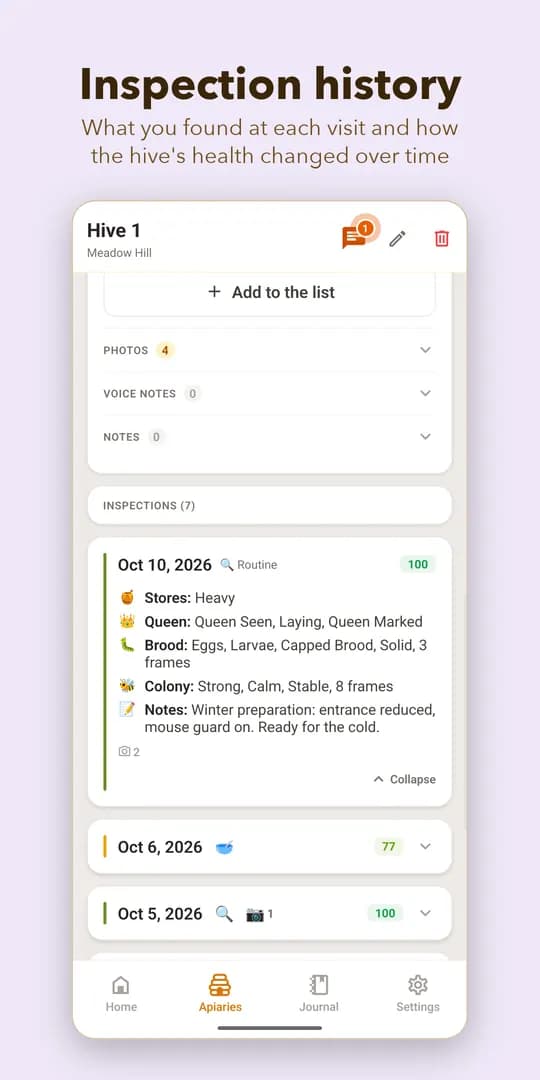
Quick Log is made for the apiary: big buttons, one answer per screen and automatic moves to the next step. What you tap stays saved on the hive, with the date, and you find it again in the hive’s history.
Quick Log, screen by screen
Quick Log goes through seven short screens, in the order you check a frame. In total it takes about 30 seconds.
Start
Tap the + button, choose “Quick Log” and the hive. Or scan the QR code on the hive and the hive is already chosen.
Queen, brood, stores, temperament
On each screen you tap one answer: Queen Status, Brood Pattern, Honey & Pollen Stores, Temperament. The app moves on by itself.
Any Problems?
Tick what you see, or “None”, and add a note if you like.
What did you do?
Open only what applies: feeding, treatment or harvest (harvest is in Pro). If you did nothing, skip it.
Review & Save
Read the summary, optionally set a follow-up date as a reminder and tap “Save Inspection”.
See the score
You get the health score (0–100) and any recommendation, then move on to the next hive.
The health score, from 0 to 100
After every Quick Log, BeePulse works out a score from what you observed. It shows at a glance which hives need attention, without rereading your notes.
- 85–100: Excellent
- 70–84: Good
- 50–69: Fair
- 30–49: Poor
- 0–29: Critical
Start at the hive: the QR code
You print a QR code for each hive from “My Hives” (the “Print QR Code” button) and stick it on the hive body. In the apiary, from the + button you choose “Scan QR”: the hive is picked for you and Quick Log starts straight away, with no scrolling through a list.
It is the fastest way when you have dozens of hives with similar names.
The full form, when you need detail
For a closer visit you use the full inspection, on the phone or on the computer, with “New Inspection”. You pick the type: routine, treatment, feeding, harvest, queen check, problem or note.
- Queen: seen, laying, queen cells, marked and colour
- Brood: eggs, larvae, capped brood, pattern and frames of brood
- Treatment: product, method, dose, varroa count
- Harvest (Pro): honey, wax, propolis, frames taken
- Photos (Pro): up to 10 per inspection
- Follow-ups and notes
Follow-ups and what is left to do
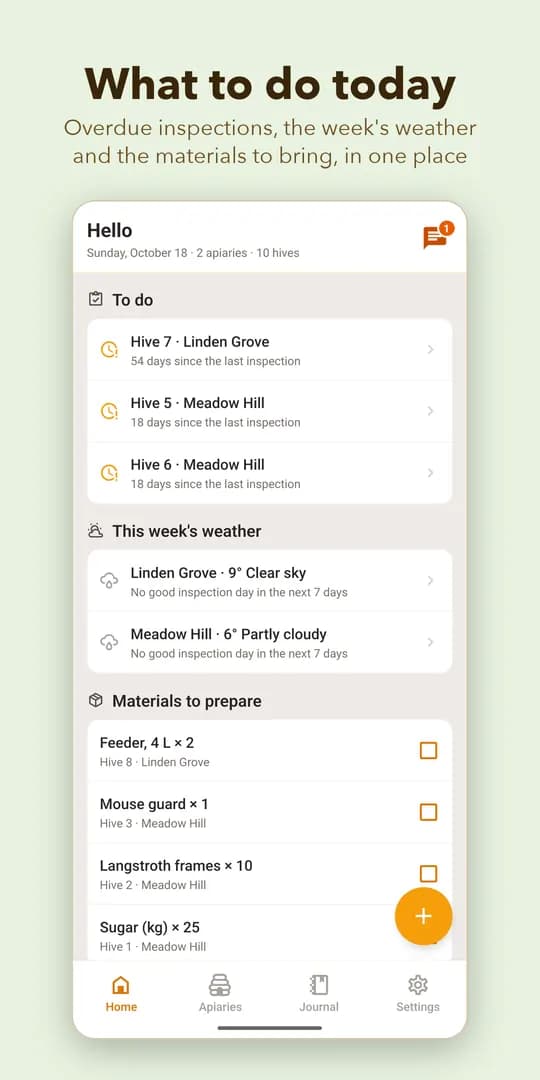
At the end you can set a follow-up date. On “Home”, under “To Do”, you see the hives waiting for a visit and how many days have passed since the last inspection. The same screen shows the week’s weather for each apiary and the good inspection days: at least 15 °C, wind under 30 km/h, no rain.
Works without signal, on phone and computer
Without signal the inspection is saved on the phone and sent by itself when the connection returns; a bar at the top shows what is waiting to sync. The iPhone and Android apps and the web app use the same account, so an inspection made in the apiary appears at once on the computer, in the hive’s history and in the Journal.
What is free and what is Pro
On the free Start plan you get unlimited inspections (Quick Log and the full form), the health score, QR codes, follow-ups, weather and offline mode, for up to 3 apiaries and 10 hives. Pro adds photos, harvests, data export and voice inspection. Pro costs €60/year + VAT, and you get 15 days of Pro when you sign up.
Frequently asked questions
How long does it take to record an inspection in the app?
- Quick Log has seven short screens with one answer each and takes about 30 seconds. If you want more detail, you use the full form.
Can I record an inspection in the apiary without signal?
- Yes. The inspection is saved on the phone and sent by itself when the signal returns. The health score appears after syncing.
What does the health score mean?
- A number from 0 to 100 worked out from what you noted at the inspection: 85–100 Excellent, 70–84 Good, 50–69 Fair, 30–49 Poor, 0–29 Critical. It is a guide to see which hives need attention, not a diagnosis.
How many inspections can I record for free?
- Typed inspections are unlimited on every plan. The Start plan limits only the number of apiaries (3) and hives (10).
Can I also record inspections from a computer?
- Yes. In the web app, under “Inspections”, press “New Inspection”, choose the hive and the type and fill in the form. Everything also appears on the phone, in the same account.
How do I find the right hive quickly when I have many?
- Print a QR code for each hive from “My Hives” and stick it on the hive. In the app choose “Scan QR” and Quick Log starts for the hive you scanned.
More about BeePulse
Record your first inspection in 30 seconds
No card · 15 days of Pro included · Then stay free, or move to Pro when you want more